

5 things you need to know about responsive design
You’ve found a Squarespace template that fits your business, picked out your brand colors, and started adding your photos and copy. Your website is finally starting to feel like you! But before you hit publish, there’s one important thing to consider: How does your website look and work on a phone?
Responsive design is what helps your website adapt to different screen sizes, from a large desktop monitor to a tablet or smartphone, and getting it right matters. Potential customers might discover your dog daycare on their morning commute, look up your wellness coaching services while waiting in line, or search for a tutor from their phone at the kitchen table.
Choosing a professionally designed, industry-specific template gives you a responsive design from the start, and from there, a few thoughtful adjustments can help you create a website that looks polished and works well for your customers.
Here are five things you need to know about responsive design before launching your site.
1. Your website needs to work on more than a desktop
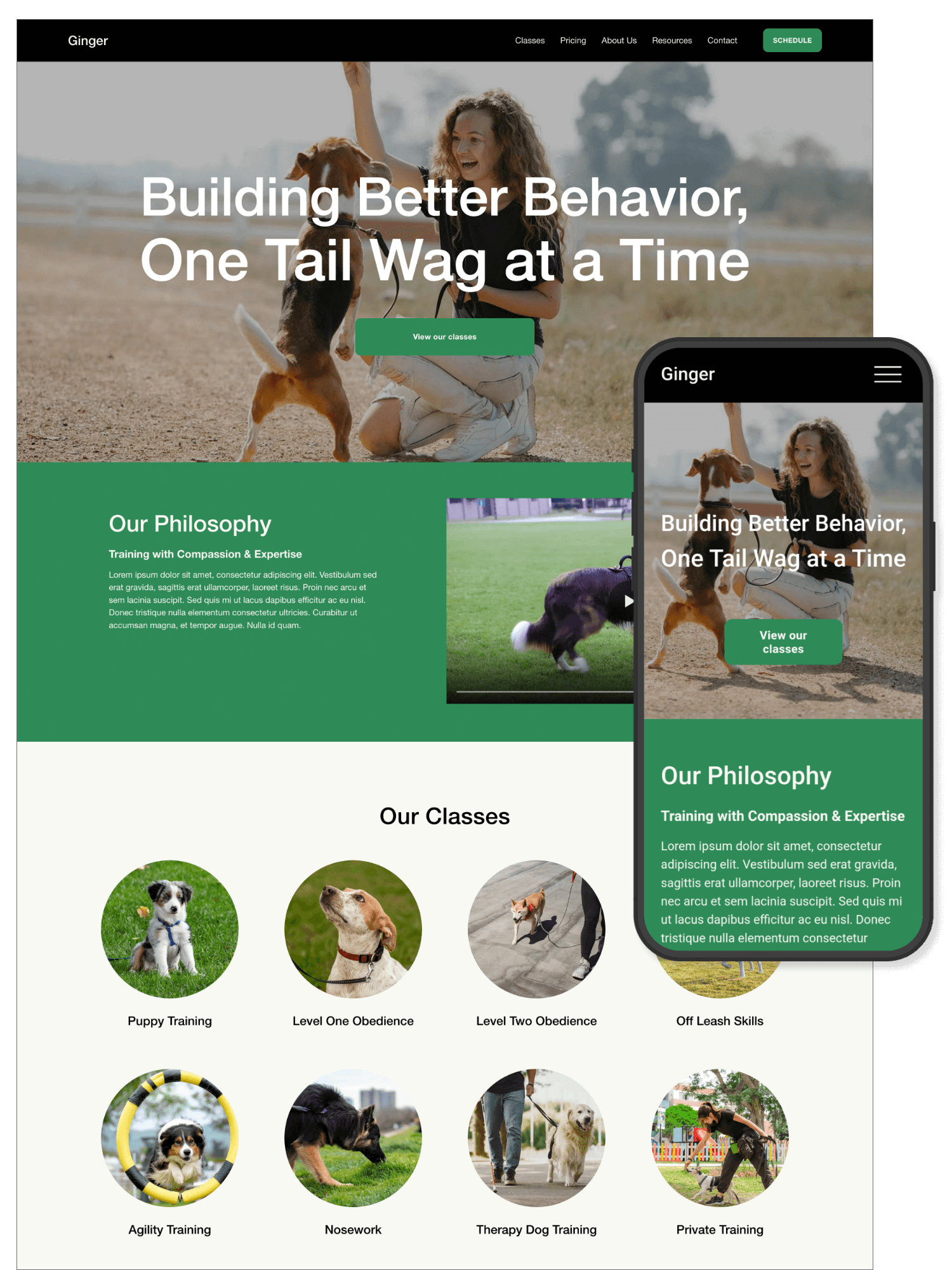
It's tempting to design your website on your laptop and call it a day, but your visitors won't all be using the same device. In fact, many visitors are viewing sites on their phones first.
A responsive website adjusts its layout to fit the screen it's being viewed on. Images resize, content rearranges, columns stack, and navigation adapts to smaller screens.
Why does this matter for your business? Because your website should make it easy for potential customers to learn about your services and take the next step, no matter how they're browsing.
What to check as you customize your template:
Headings: Do they fit comfortably on a phone screen, or do they break into awkward lines?
Images: Are important details still visible when images resize or crop?
Text: Is your content easy to read without zooming in?
Buttons: Can visitors easily tap your calls to action, such as “Book a Consultation” or “View Services”?
Navigation: Can visitors find the pages they need without struggling with the mobile menu?
The template advantage: A premium Squarespace template designed by a professional already gives you a responsive starting point. Instead of building every page layout from scratch, you can customize an established design and focus on making it your own.
2. Mobile design is about more than making everything smaller
Responsive design is about about making smart layout decisions for smaller screens, rather than just shrinking your desktop website until it fits on a phone. For example, a desktop homepage might display three service cards side by side. On a phone, those cards should stack vertically so visitors can read each one without pinching or zooming.
What to do as you customize your template:
Keep your most important information near the top of the page.
Break long paragraphs into shorter, more readable sections.
Use clear headings to help visitors scan your content.
Check image crops to make sure the subject remains visible on smaller screens.
Avoid adding so many decorative elements that the mobile experience feels cluttered.
Remember, your mobile homepage doesn't need to look exactly like your desktop homepage, but it does need to communicate the same message and make the same important actions easy to find.
The template advantage: Professionally designed templates use intentional layouts, spacing, and content hierarchy to create a cohesive experience both on desktop and mobile, so you don’t have to start from scratch. When you start with an industry-specific design, the page structure is already geared toward the type of business you're running.
3. Your images and fonts can make or break the mobile experience
Beautiful imagery and distinctive typography help your brand stand out, but the choices that look fantastic on a large screen can sometimes create problems on mobile. For example, an oversized heading might take up half a phone screen, a detailed image might lose its focal point when cropped, or a large background image can affect loading performance, especially for visitors with slower connections.
A few simple ways to improve your mobile design:
Choose readable font sizes. Make sure body copy is comfortable to read on a small screen.
Keep headings manageable. Shorter, more direct headings are often easier to scan.
Optimize your images. Use appropriately sized, compressed images rather than uploading unnecessarily large files.
Check image focal points. Make sure faces, products, pets, and other important subjects remain visible when images crop.
Use contrast thoughtfully. Text should stand out clearly against its background, including when viewed outdoors on a phone.
In Squarespace, you can preview how your content looks on different devices and adjust your design settings where available. Some layout and styling controls behave differently depending on the section or block, so check the actual result rather than assuming a desktop adjustment will translate perfectly to mobile.
The template advantage: A premium template gives you a curated starting point for typography, imagery, and visual hierarchy. You can swap in your own brand fonts, colors, and photos while keeping an eye on how those choices affect readability and balance.
4. Your mobile website should make the next step easy
Your website’s purpose is to help potential customers understand what you offer and decide whether you're the right fit. That means your calls to action need to work especially well on mobile.
Imagine a parent searching for a tutor, a pet owner looking for a grooming appointment, or a potential client exploring wellness coaching. They might be ready to contact you right now, but if your booking button is difficult to find, your contact form is frustrating to complete, or your navigation is confusing, you could make that decision harder than it needs to be.
Make your mobile website more user-friendly by:
Placing important calls to action where visitors can easily find them.
Using specific button text, such as “Book a free consultation” instead of a vague “Click here.”
Keeping forms short and asking only for the information you actually need.
Making phone numbers and email addresses easy to use on mobile.
Giving visitors a clear path from learning about your services to contacting you.
Decide what action matters most on each page and make that next step obvious.
The template advantage: Industry-specific templates are built around the needs of particular businesses. A tutoring template may emphasize consultation bookings, while a pet care template might prioritize service information and appointment inquiries. That gives you a useful framework for guiding visitors toward the actions that matter most to your business.
5. Always test your website on a real phone before launching
Here's one of the most important things to remember: a website that looks great in the Squarespace editor isn't automatically ready for launch. Previewing your website on a smaller screen is a great start, but testing it on an actual phone helps you catch issues that might otherwise go unnoticed.
Examples include: a heading might wrap unexpectedly, a button might be harder to tap than you realized, an image could crop in an awkward way, or a form might feel too long when you're completing it on a small screen.
A quick mobile review can help you catch these problems before your customers do.
Your mobile-friendly website checklist:
Open your homepage on your phone and scroll through the entire page.
Check every page in your main navigation.
Tap each button and test every important link.
Complete your contact form or booking inquiry from your phone.
Make sure headings, paragraphs, and buttons aren't overlapping or getting cut off.
Check image crops and confirm that important content remains visible.
Review your footer, social links, and contact information.
Test your website on more than one screen size if possible.
Ask someone unfamiliar with your website to find your services and contact you.
Don't forget to check your website again whenever you make significant changes. Adding a new section, switching to a different font, or replacing an image can affect the way a page looks on mobile.
The template advantage: A professionally designed template gives you a strong foundation, but your customized website is unique. Your photos, copy, section choices, and branding all influence the final result. Testing your finished site helps ensure those personal touches work just as well on a phone as they do on a desktop.
Why start with a premium Squarespace template?
If responsive design sounds like a lot to think about, here's the encouraging part: you don't have to figure everything out on your own. Starting with a well-designed, industry-specific Squarespace template can save you a lot of time and give you confidence as you build your website. Rather than staring at a blank page and wondering where everything should go, you begin with an intentional design created for the needs of a business like yours.
A well-designed template provides several advantages:
A responsive starting point. Mobile layouts are considered as part of the design process, so you're not starting with a desktop-only design and trying to make everything fit afterward.
A structure built around your industry. Your pages and sections give you a practical starting point for showcasing your services, answering common customer questions, and encouraging inquiries.
A cohesive visual style. Typography, spacing, image placement, and layout work together to create a polished, professional appearance.
More time to focus on your business. Instead of designing every element from scratch, you can concentrate on your messaging, imagery, brand identity, and customer experience.
Flexibility to make it your own. You can personalize colors, fonts, images, copy, and layouts to reflect your brand while building on an established design.
Of course, a premium template isn't a guarantee that every customization will work perfectly on every device. The quality of your images, the amount of content you add, and the changes you make can all affect the finished result. That's why mobile previews and real-device testing are still important.
Think of your template as a head start. It gives you a thoughtful foundation so you can spend less time worrying about the design basics and more time creating a website that feels like your business.
Ready to build a website that looks great on every screen?
Your business deserves a website that makes a great first impression, communicates what you offer, and helps potential customers take the next step.
With an industry-specific Squarespace template, you can start with a professional design that already considers responsive layouts, then customize the details to reflect your brand. A little attention to mobile usability along the way can make a big difference in how visitors experience your website.
At Weiler Design Studio, you'll find premium Squarespace templates created with your industry in mind. Explore the designs, find the one that fits, and start building a website you feel proud to share.
